I said "create a Halloween watch face" to my wrist, and wore it about 90 seconds later
My personal agent can change what my Wear OS watch face looks like from a spoken sentence. A small Java generator draws the face, a headless test checks it, and the watch installs it over the air, with no Play Store, no ADB and no laptop.
I raise my wrist and say: “Create a Halloween watch face.” About 90 seconds later a row in my watch app says “Update watch face”, I tap it, confirm once, and the bezel is pumpkin orange. The phone stays in my bag the whole time.
“Create a brown watch face” works the same way, with different colours. Neither involves me opening an editor, so this post is about what is underneath: why a code-less package, a generator that draws the face, a test that stands in for my eyes, and an install that happens on the watch itself.
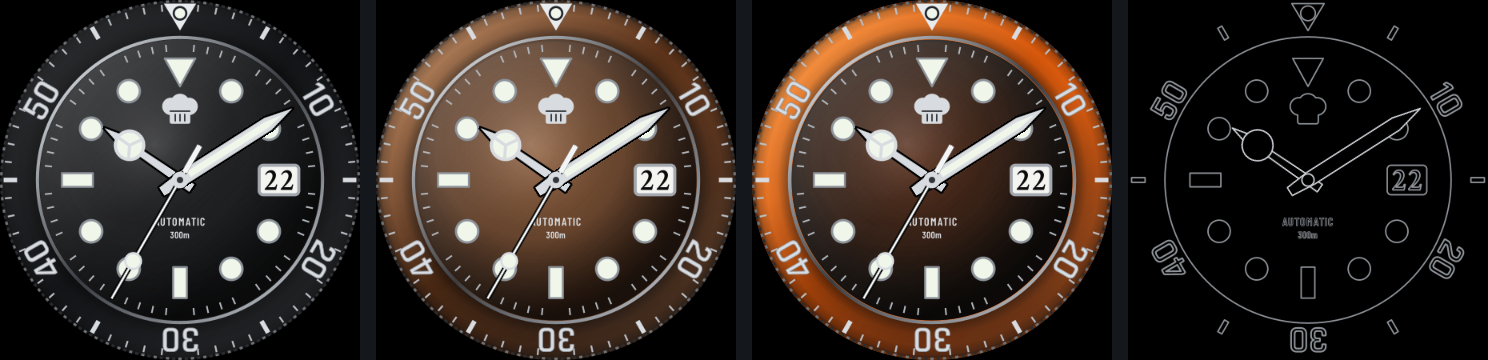 Black, brown, Halloween, and the same face in ambient mode (outlines only). These are renders from my build’s own test harness, not photos of the watch.
The route, in six steps
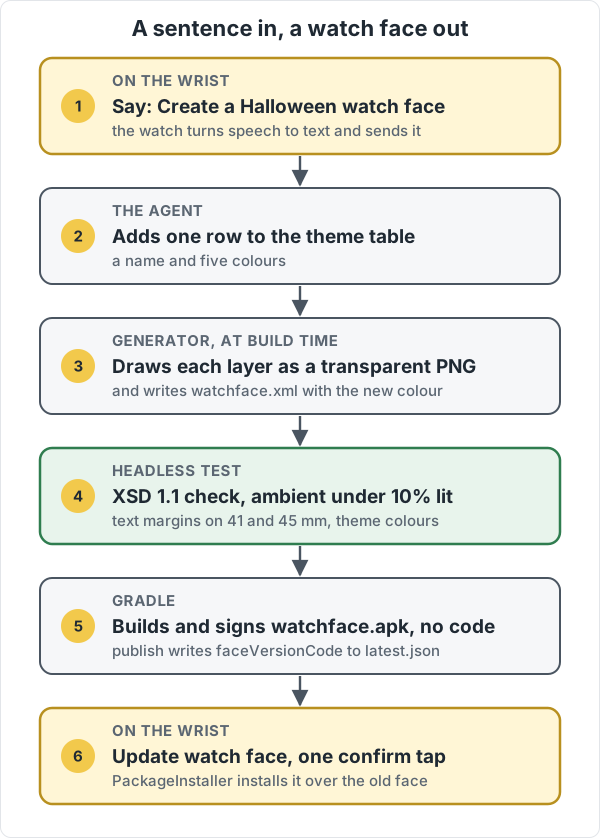 One sentence goes in on the left. Every step after the second is a program, not a person.
The agent is a personal assistant I run on my own server, and the watch app is a small Wear OS app of mine that talks to it. Speaking is just how I send it text. What the agent does with “Halloween” is the interesting part, and it starts with the format the face has to be in.
Why not write a normal watch face
The old way to make a watch face on Wear OS is code: you write a service that draws the face every frame. It is flexible, and it is being phased out. Google’s own direction is the Watch Face Format (WFF): a declarative XML file with no executable in it. 9to5Google’s write-up of the timeline says new Wear OS 5 watches only support WFF, that every new face on the Play Store has had to use it since January 2025, and that legacy faces built on AndroidX or the Wearable Support Library can no longer be installed from Play as of January 14, 2026.
That timeline is about Play, and my faces never go through Play. But the lesson holds for me: a face that is code is a face I have to keep alive across Wear OS versions, and a face that is data is one a program can write.
A WFF face is a standalone APK with hasCode="false". It has one document, res/raw/watchface.xml, and a pile of PNGs the XML places, rotates and stacks. The watch’s renderer does the rest, and it is also what keeps battery use low: nothing of mine runs on the watch.
A generator, not a drawing tool
The usual way to make a WFF face is Watch Face Studio on a laptop. I did not want a laptop in the loop, and I did not want an agent hand-editing XML either, since one wrong attribute and the watch refuses the face.
So the face is a small Java program. A class called DiveFace knows how to draw each layer of a Submariner-style diver, in a coordinate system 100 units from the centre to the edge of the screen. A second, FaceAssets, renders those layers to transparent PNGs at build time and writes the watchface.xml that stacks them. The layers:
- a coin-edge bezel, with Rajdhani numerals on the minute track,
- luminous indices on the dial,
- a Mercedes-style hour hand, a sword minute hand and a thin seconds hand,
- the date window, with the digits drawn in Crimson Text (WFF cannot load an arbitrary font, so each digit is a PNG and the XML declares a bitmap font out of them),
- and a few translucent groups on top: a ceramic sheen on the bezel, a shadow on its far edge, and a glow on the dial.
 Eight of the layer PNGs, side by side. The orange and brown never appear in any of them.
That last point is what makes a new colour cheap. The bezel insert and the dial are not images. The XML draws them as flat ellipses filled from a ColorConfiguration, and the translucent layers sit on top, so the same sheen reads as shiny ceramic on black, brown or orange. Each theme is one row in a table in DiveFace: a name, the bezel colour, the dial colour, and three tints for the sheens. The agent’s whole job for “Halloween” is to add a row, and the generator writes the colour option and its name into strings.xml, so it shows up in the watch’s colour picker.
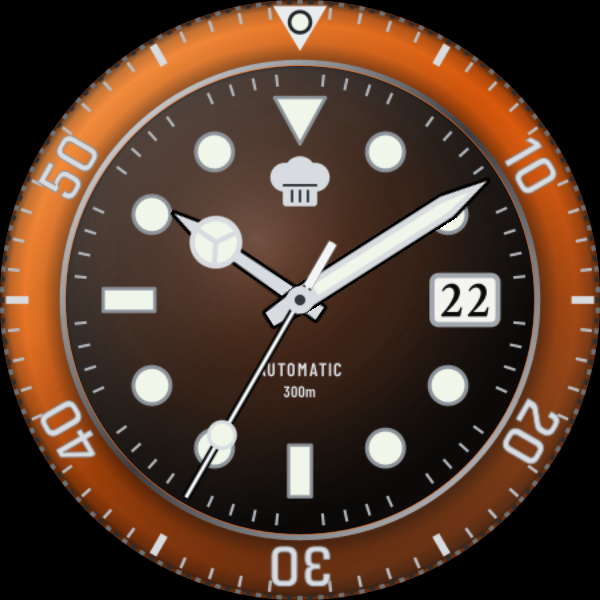 The row the agent added: an orange bezel, a near-black warm dial, and sheens tinted to match.
A test that checks the face before I do
If the agent can write a face, it can also write a broken one: text clipped on a small watch, a bezel that lights up half the screen in ambient mode, or XML the watch refuses. So nothing is packaged until a headless test, WatchFaceTest, has passed. It does not need a watch or an emulator. It checks:
- The XML is valid WFF.
watchface.xmlis validated against Google’s WFF v1 schema. That schema is XSD 1.1, which the JDK’s own validator cannot read, so the test pulls in Xerces’ 1.1 build. It also feeds the validator a document with a deliberately bad attribute and fails if that one is accepted, so I know the check is not vacuous. - Ambient mode is dim. Always-on mode burns pixels and battery. The test renders the ambient layers and fails if more than 10% of the circular screen is lit.
- Text fits on both screens. It places the logo layer where the XML puts it, scales it to a 41 mm and a 45 mm screen, and fails if any corner of its ink falls outside the dial’s safe inset. This is a fix for a real bug: an early version cropped the wordmark on my 41 mm watch.
- The new theme is the colour it claims to be. It renders the face with each theme and samples pixels. For brown it asserts red above green above blue on both the bezel and the dial. For Halloween it asserts a strongly orange bezel and a near-black warm dial.
The render in that test is my own small stand-in for the watch’s renderer (WffRender). It reads the generated XML and the PNGs, and stacks them in memory the way the XML says. It is not Google’s renderer: fonts and filtering differ, and it supports only the elements my document uses. So the test proves the geometry, the layer order and the colours, but it does not replace looking at the real face once. For that I still look at my wrist.
Getting it onto the wrist without a store or a cable
With the test green, Gradle builds the face as a release APK with its own package name, signed with the same key as my watch app, and with hasCode off. The code-less part matters here too: the build’s code shrinker (R8) has nothing to keep and the whole package is about 400 KB of PNGs and one XML file. A publish step copies it to my server as watchface.apk and writes the face’s new version code into latest.json, next to the app’s own version.
The watch app already asks latest.json what is current. When the face version on the server is ahead of the installed one, a row in the app’s settings changes from “Install watch face” to “Update watch face” with the new version number. Tapping it streams /api/watch/face over HTTPS and hands the file to Android’s PackageInstaller, which shows a confirmation, and I tap once. Because the package name and the signing key are the same and the version code is higher, Android replaces the old face in place. There is no Play review, no ADB cable and no sideload dance.
Two things are still by hand. The very first install needs me to add the face from the watch’s face picker, and the agent does not switch themes for me: I pick the new colour in the face’s customise screen.
What it is good for
None of these faces is a product. I do not think a better Submariner is the point. The point is that “what do I want my watch to look like today” has moved from a design session to a sentence, and a sentence is enough because the hard parts, validity, legibility on a small screen and ambient power, are checked by a test and not by my taste at 7 am.
It also makes the agent’s change reviewable. A new face is a one-row diff in a table, and the test says whether that row broke anything.
What I do not trust yet:
- A stand-in renderer is not the watch. If Google’s renderer treats something differently, I find out on my wrist.
- The sentence is mapped to colours by the agent’s judgement. The theme it named “Halloween Rolex” came out orange and black, which I liked, but a prompt like “make it feel like autumn” would be a guess I would want to preview first.
- It only varies colour. A new shape or a different font means changing the generator, not just a row. That is a bigger change, and I would rather review it as code.