The phone goes in the bag. A realistic kit for a personal agent you wear.
An earbud with a small camera, a watch as the hub with the LTE link, an optional ring, and an assistant on a server you own. The full design: device roles, links, tiers of compute, battery budget, privacy, a simulated day and an honest scorecard.
Laptops did not disappear when phones arrived. They went into the bag, and they come out when there is real work to do: a long document, a spreadsheet, a lot of typing. I think the phone is heading the same way. Most of what we pull it out for is small: what’s next, reply to this, log that, play something, how far did I run. A personal agent that can hear you, see what you see when you ask, and talk back in your ear can do most of those without a screen.
This is a concept design, not a product, and not a “ten years from now” post. Everything below is built from parts that ship today or are one modest step away. The interesting part is what you have to give up to make it work on a real battery. Below is the whole design: who talks to whom, where the compute lives, the power budget, and what still does not work.
The kit
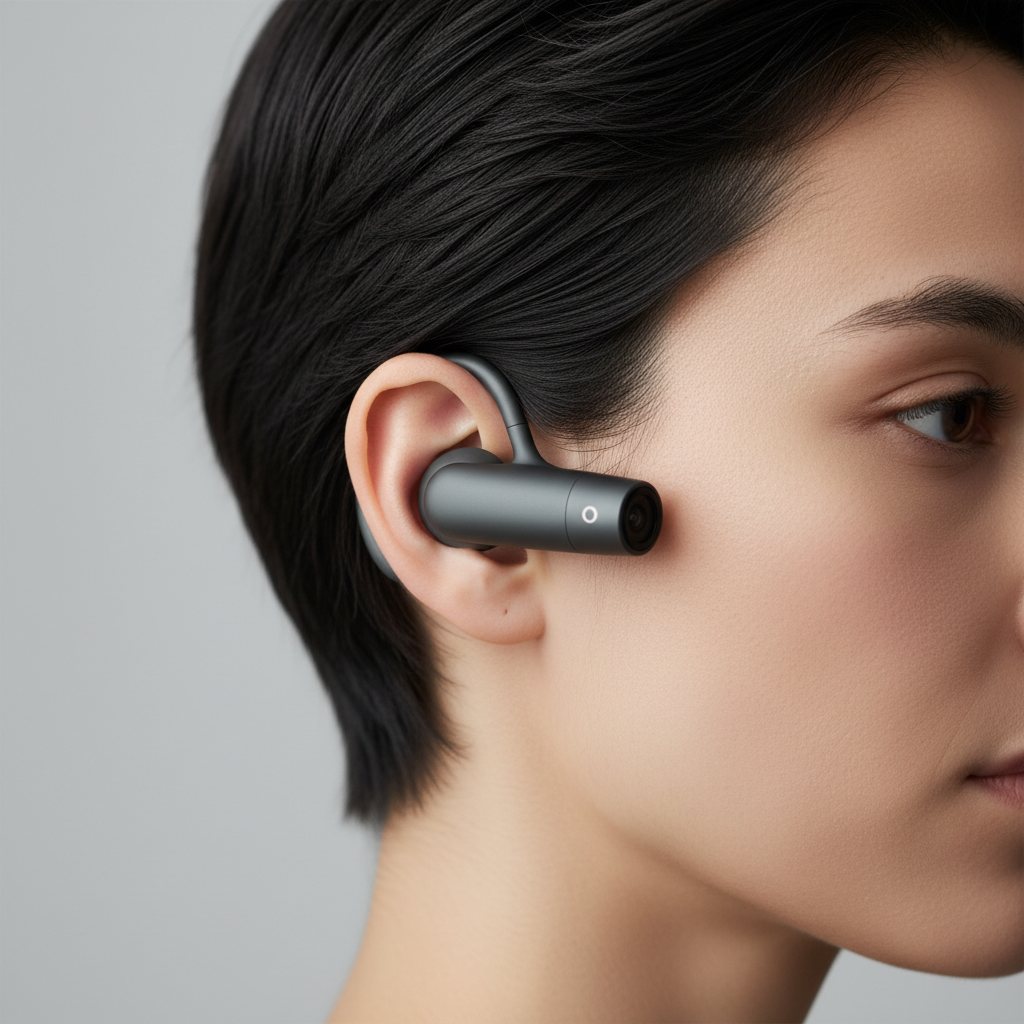
Three devices, one job each.
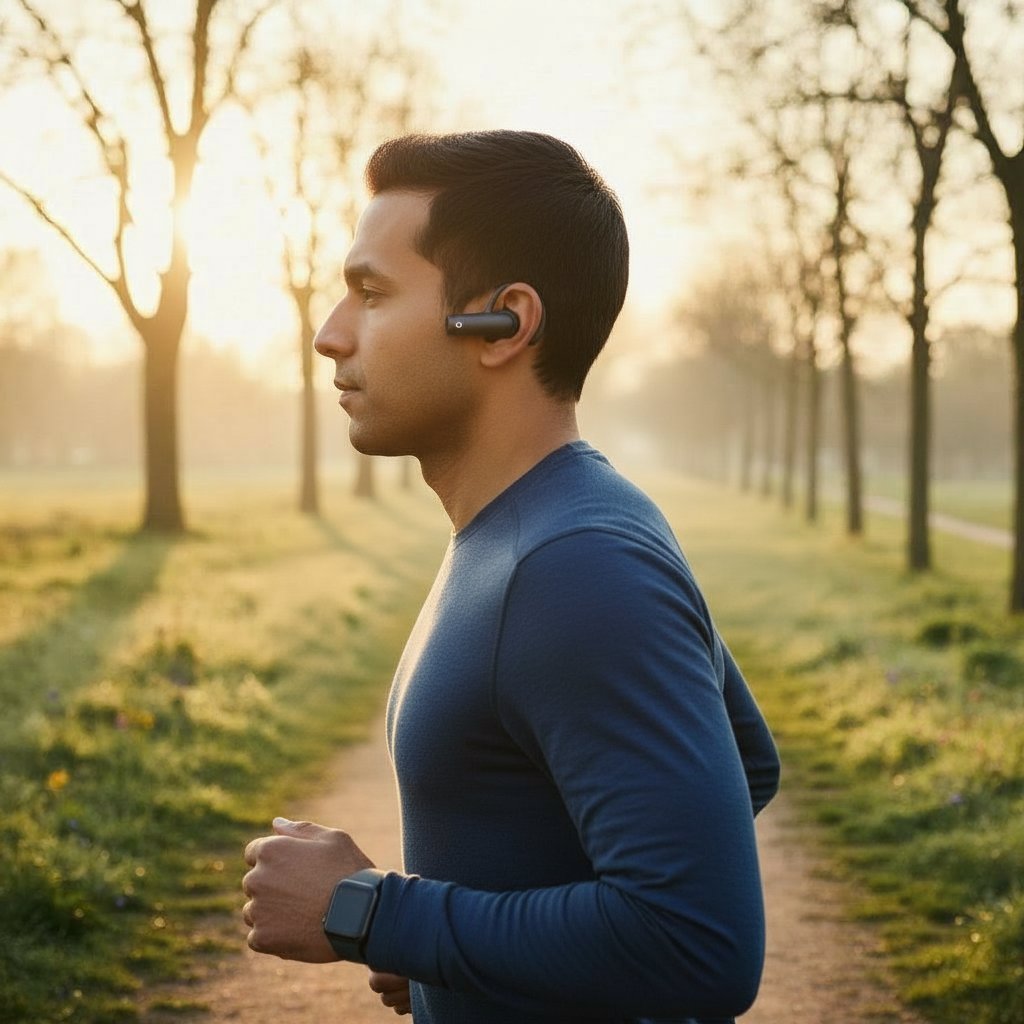
The buds: private voice and an eye-level camera. An open-ear earbud with a small camera. The ear sits almost exactly at eye line, so a tiny camera there sees roughly what you see, without changing how you look. It has a mic, a speaker and Bluetooth only: no LTE, no Wi-Fi, and no always-listening wake word on the ear. A squeeze or tap is the talk/capture button, and it hands the moment to the watch. Open-ear means you still hear the world.
The watch: the hub. It carries the LTE link to the assistant, the screen (chat, a photo preview, approval taps, notifications) and all-day health tracking. It needs no hardware change. It is just a relay app, costing a few percent of battery a day.
The ring: optional. Only worth wearing for more comfortable or more accurate sleep tracking if you take the watch off at night.
Also optional: glasses for people who want a display (they change your face, so never the default) and an EMG wristband for silent finger gestures in a quiet room.
An assistant on a server you own. The thinking happens on a home machine or cloud server running your personal agent, the way people already run things like Muse, Dot or a Grok bot, or something new. It holds your memory, tools and accounts. What you wear is its eyes, ears and hands.
The phone is not part of the daily kit. It stays in a bag, like a laptop, for jobs that need a screen or keyboard.
The honest trade-off: the bud is slightly bigger than a plain earbud. The camera, the flash for clips and a larger cell all have to fit.
The body-area network
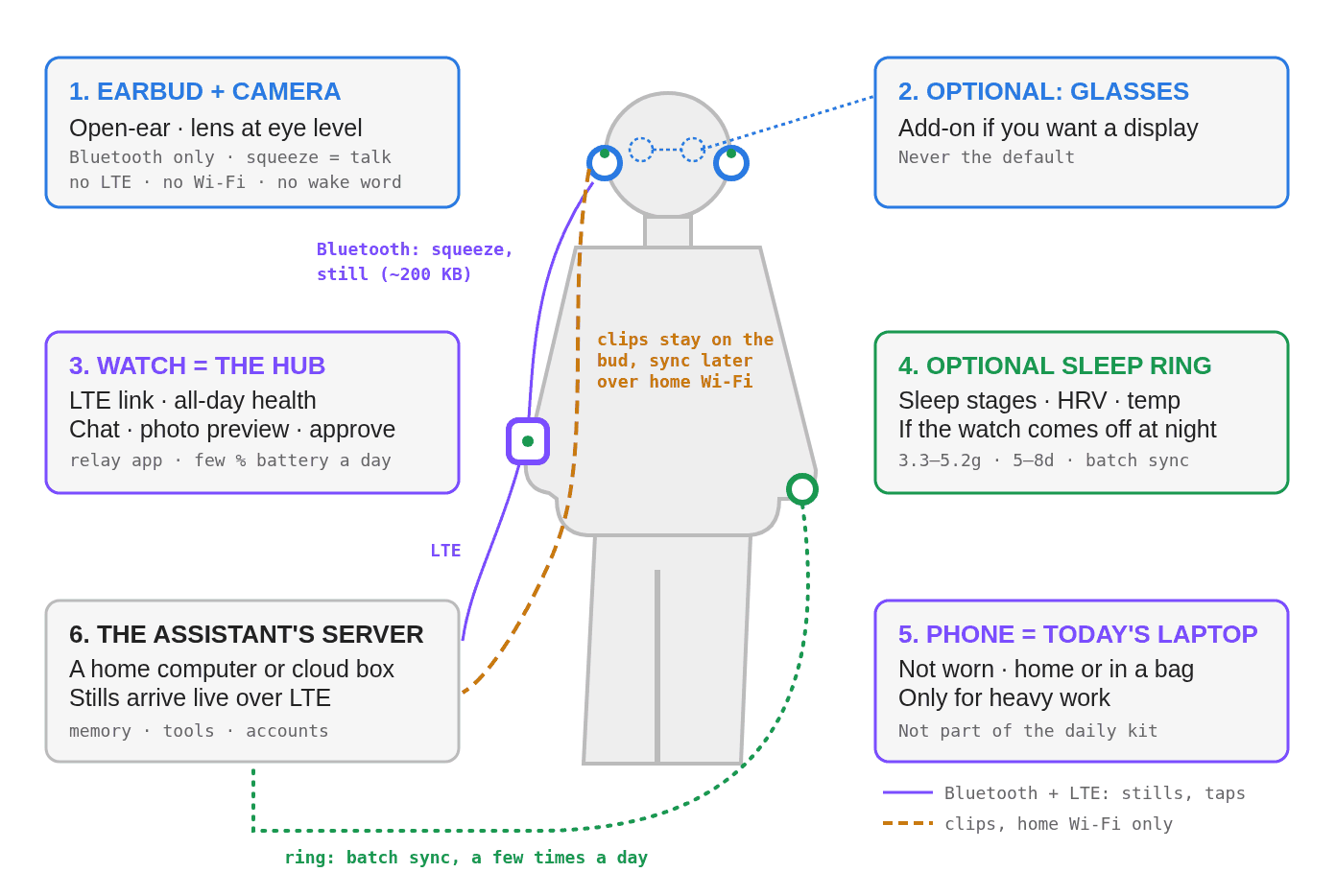
Figure 1. The bud talks Bluetooth to the watch and nothing else. The watch carries the LTE link. Short clips never travel: they sit on the bud’s flash and sync to a home computer over home Wi-Fi later.
Each device has a narrow role and its own kind of link:
| Device | Role | Link | What it sends |
|---|---|---|---|
| Earbud + camera | Voice in/out, eye-level camera | Bluetooth to the watch only | A squeeze event, audio when you talk, one ~200 KB still per capture |
| Earbud flash | Stores short clips (10–30 s) | Home Wi-Fi, later, to a home computer | Clips, only when home. Never over LTE |
| Watch | Hub: LTE, chat, preview, approvals, health | Bluetooth to bud; LTE to the assistant | Small messages and stills |
| Ring (optional) | Sleep tracking if the watch is off | Batch sync | Sleep, heart, temperature summaries |
| Optional glasses, EMG band | A display; silent gestures | Local link to watch | Text; pinch events |
| The assistant | Memory, tools, accounts, long jobs | LTE in, sanitized request out | Replies, reminders |
| Phone | Heavy work | Its own | Nothing, unless taken out |
The split is the core of the design: live things are tiny, big things wait. A squeeze event and a single sharp frame are small enough to relay over Bluetooth and LTE in a second or two. A clip is big, so it stays where it was recorded.
Three tiers of compute
Put each job where it is cheapest in milliwatts and latency.
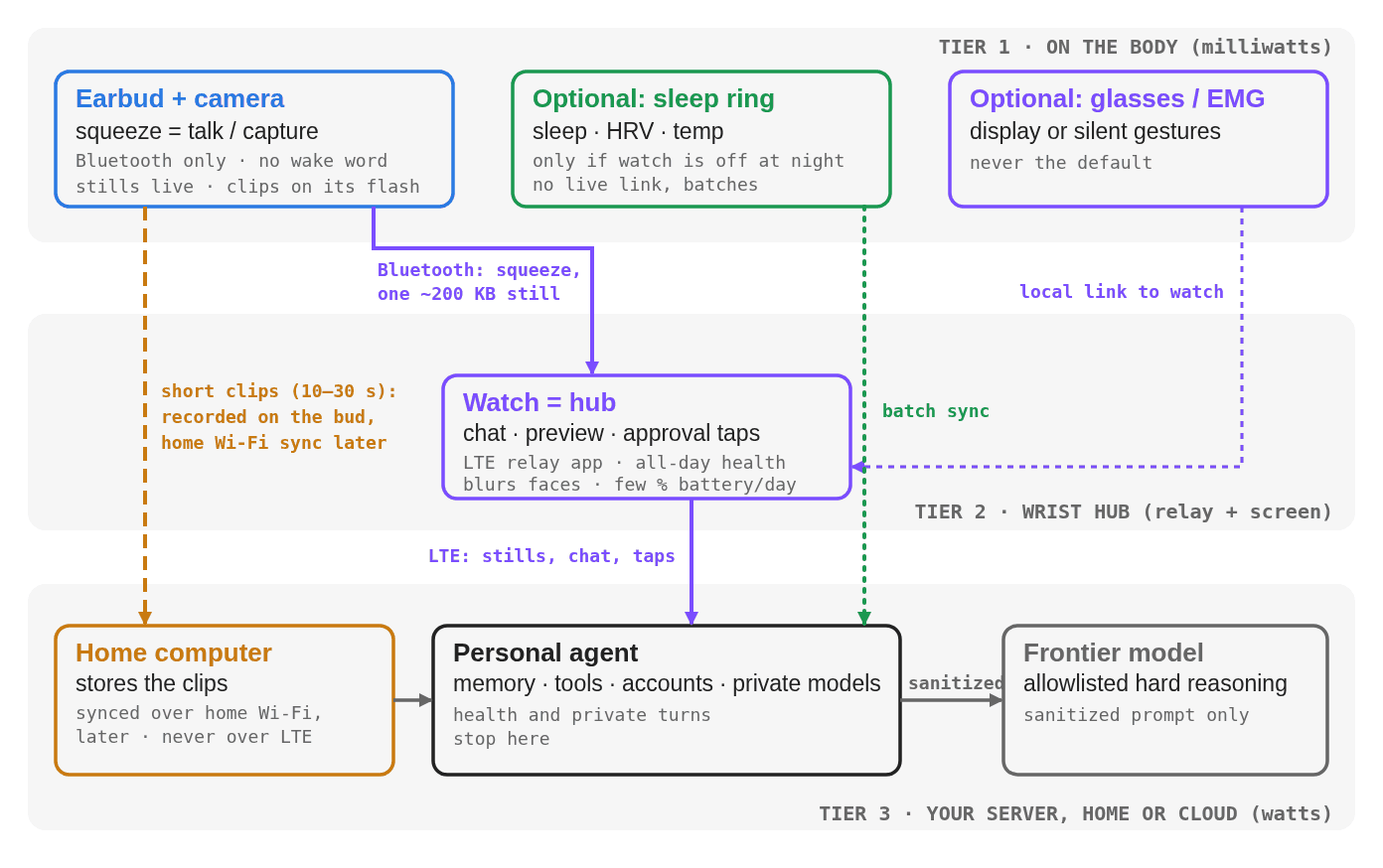
Figure 2. Stills go bud, watch, assistant over Bluetooth plus LTE. Clips go bud to a home computer over home Wi-Fi, later.
Tier 1, on the body. The bud captures sound and light, and does nothing clever: no wake word, no vision. It waits for your squeeze, so its radio and camera are idle the rest of the day.
Tier 2, the wrist. The watch relays the still, shows you a preview, takes your approval taps, blurs bystander faces before anything leaves it, and tracks your health all day.
Tier 3, your server. The assistant runs on a home or cloud machine you own: code, research, memory, tool calls. Health data and private turns stop here. Only an allowlisted, sanitized request goes on to a frontier model, and only for hard reasoning.
Why the buds don’t stream
The obvious design puts a cellular radio in everything and streams video. That falls apart on battery, size and privacy. So the design is deliberately narrow:
- The bud has no LTE and no Wi-Fi. Bluetooth only, which is cheap and tiny. In practice you get about 1–2 Mbps, which is plenty for a 200 KB still (one to two seconds) and nowhere near enough for video.
- The watch is the relay, not the bulk pipe. It already has an LTE radio. Passing a few stills and chat messages a day costs a few percent of its battery.
- Clips are stored, not streamed. 10–30 seconds record to the bud’s own flash, with a recording light showing, and sync over home Wi-Fi to a home computer later.
- Live video streaming is deliberately not supported. Bluetooth bandwidth, battery and privacy all say no.
Do this and each radio is idle most of the day, which is the only way a bud, a watch and a ring each last a full day on batteries their size.
Power budget and the charging handoff
Wearable setups die when you face four charging cables every night. The fix is to stagger battery life and keep the radios idle.
| Device | What the public specs say |
|---|---|
| Watch with LTE | Roughly a day: Apple Watch Series 10 LTE is rated about 18 hours, Pixel Watch 3 LTE about 24 to 36. Charges nightly. The relay adds a few percent. |
| Ring (optional) | 5 to 8 days (Oura Ring 4), 3.3 to 5.2 g. Samsung’s Galaxy Ring quotes 6 to 8. |
| Open-ear earbud | Shokz OpenFit 2: about 9.4 g per bud, up to 11 hours, 48 with the case. A camera, flash and bigger cell cost extra size and runtime, so expect a daily case top-up. |
| Camera glasses (optional) | Ray-Ban Meta Gen 2: up to 8 hours typical, 48 with the case. |
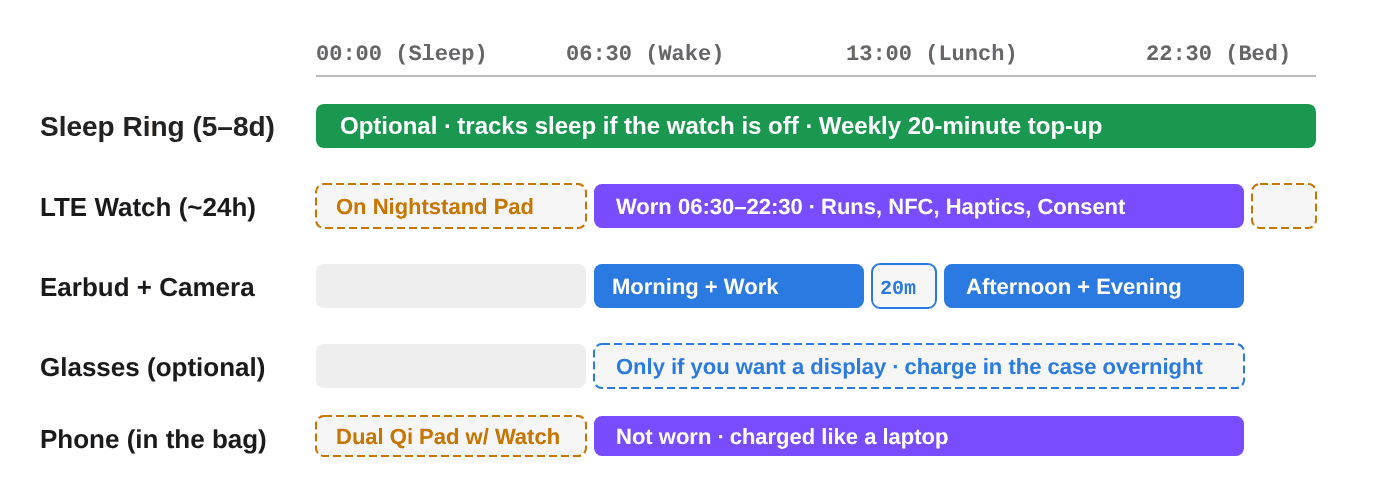
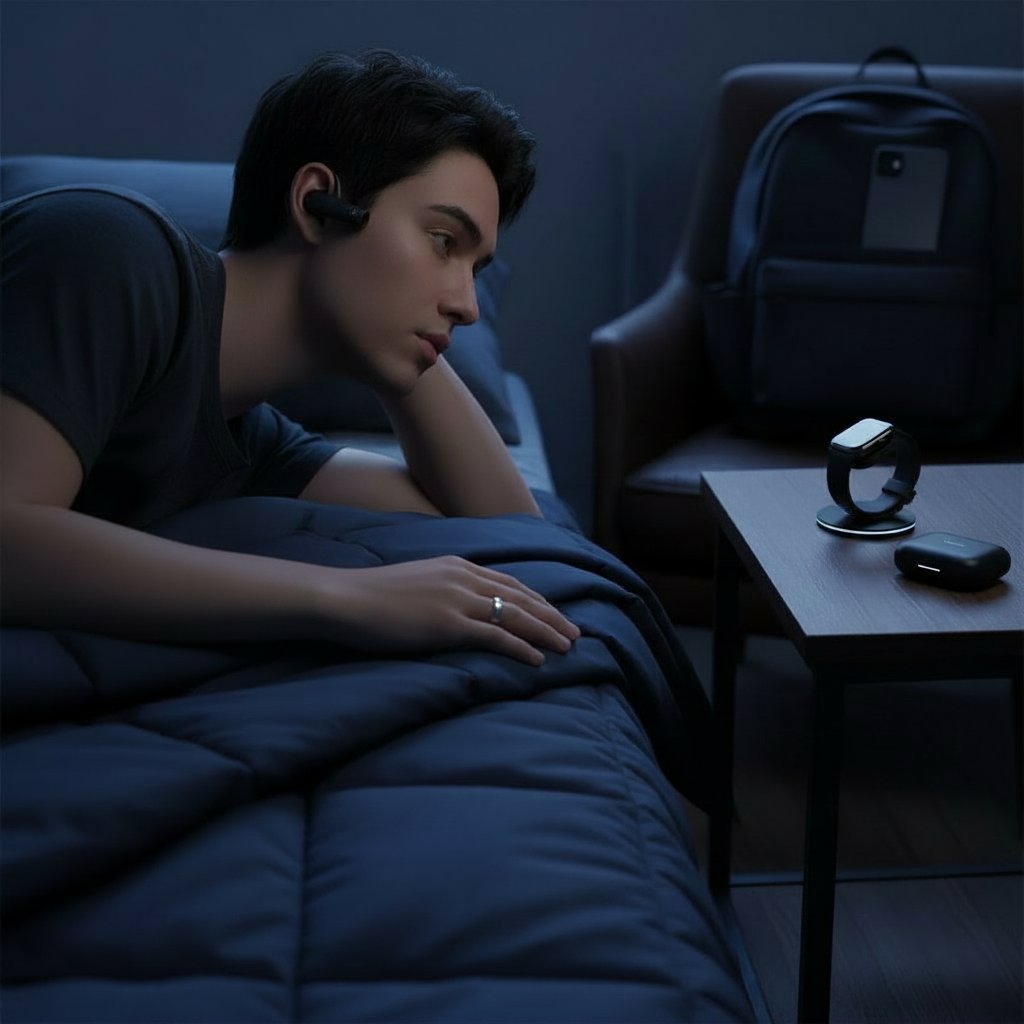
Figure 3. Watch on the pad overnight, earbud in its case for a short midday top-up. The ring is optional and only owns the night if the watch is off.
The handoff:
- Bedtime. The watch goes on a pad and the buds in their case. If you use the ring, it stays on and owns the night: sleep stages, heart rate variability, temperature.
- Morning. One line on the watch face: how you slept, your first calendar item.
- Midday. A 20-minute case top-up carries the bud through the evening.
- Weekly. The ring, if you have one, needs about 20 minutes on its charger.
Battery energy density improves by single-digit percent a year, so the plan is duty cycling and low-power radios, not a miracle cell. Nothing above needs one.
What the hardware looks like
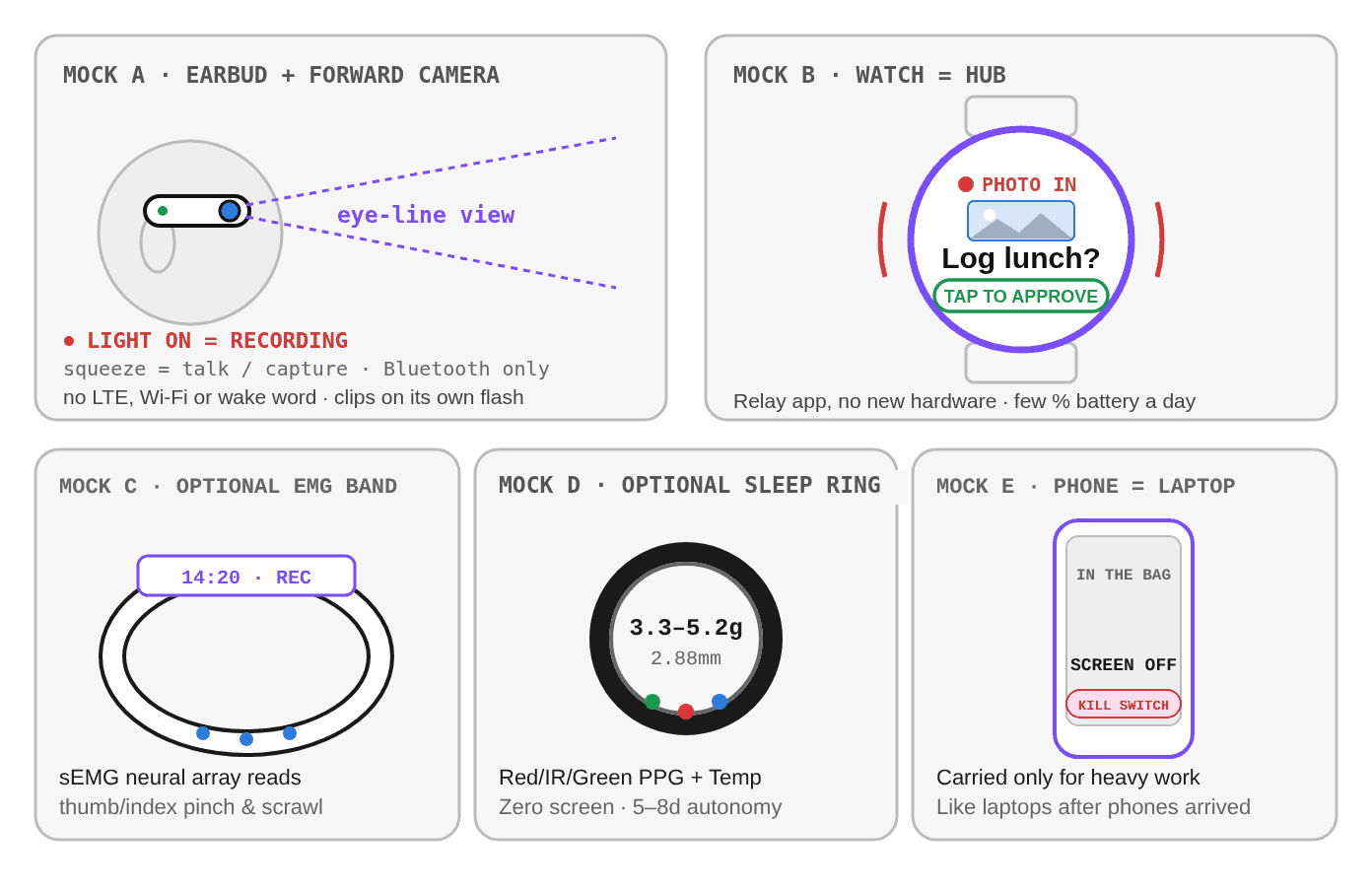
Figure 4. The five physical surfaces. The bud is the only new hardware; the watch just runs a relay app.
A. Earbud with a forward camera. An open-ear bud at the temple with a small lens on its front end, a mic, a speaker, a squeeze or tap sensor and flash for clips. A recording light is lit whenever it captures. It is slightly bigger than a plain earbud, and that is the cost of the design.
B. The watch hub. The same watch you may already own, with a relay app. When you squeeze, it shows the photo preview and, if the assistant wants to act on it (“Log lunch?”), one button to approve.
C. An optional EMG band. Sensors inside the wrist read a thumb and index pinch. Useful for silent input in a meeting, but still slow today, so optional.
D. The ring (optional). No screen: optical sensors for pulse and blood oxygen, a temperature sensor, a titanium shell. Its job is to keep score at night if the watch is off.
E. The phone, in the bag, with a hardware kill switch for its radios. It comes out for reading, typing and video.
Privacy
A camera at eye level near other people is the hard part of this design, so the rules are explicit and mechanical.
- Whisper mic. An in-ear bone-conduction sensor picks up jaw vibration, so you can whisper in public and it barely hears bystanders.
- Camera on a squeeze only. A visible recording light shows while it captures. There is no always-on vision and no wake word.
- Faces blurred on the watch. Bystander faces are blurred before a photo leaves it.
- Stills are single-use. One is sent for one answer, then deleted.
- Clips stay local. They live on the bud and a home computer, never the cloud.
- Hard off. A physical camera switch and a mic mute gesture.
Some places (locker rooms, schools, clinics) will rightly ban wearable cameras outright; the design has to respect that.
A simulated day
A Tuesday for a runner and parent who works in software, and what stands in for the phone.
- 06:30, wake. The watch comes off the pad. One line on it: how you slept, the first meeting, the school run. Replaces: the alarm and the morning check.
- 06:45, run. The watch shows pace and buzzes at turns; open-ear buds whisper directions and play a cached audio book. You squeeze and say: “note: check the latency regression after standup.” Replaces: the GPS app, music player and voice memo app.
- 07:45, school drop-off. Your kid does something great. A longer squeeze starts a 20-second clip, the light comes on, and it stays on the bud until you’re home and it syncs over Wi-Fi to the family folder. Replaces: the camera.
- 08:45, commute. The assistant reads a 90 second briefing in your ear: two pull requests merged, one waiting on a decision. You answer in a whisper: “approve the first, hold the second for my laptop.”
- 10:30, meeting. A colleague quotes an old latency number. You double-pinch (optional EMG band) and the assistant whispers the current figure, or puts it on the watch. Nobody sees a phone under the table.
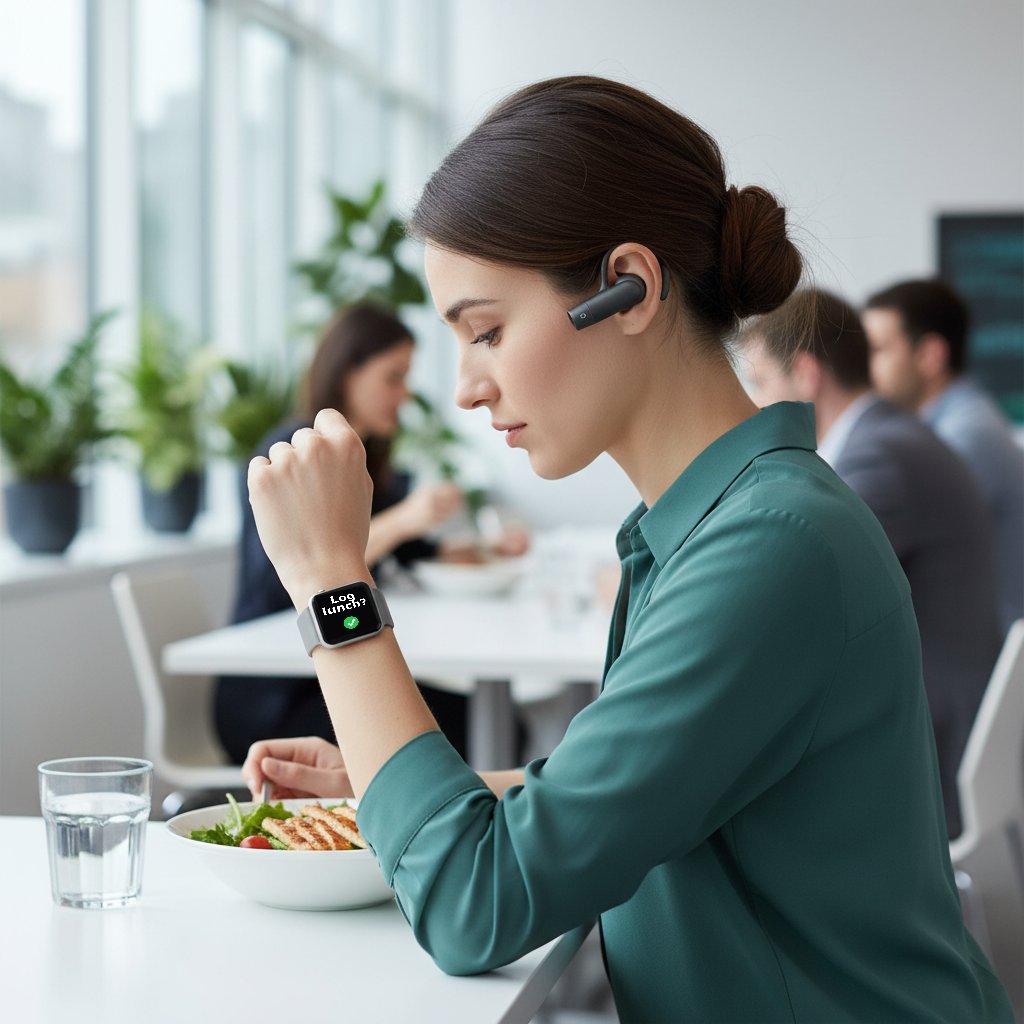
- 12:30, lunch. You look at the bowl and squeeze. The bud sends one frame to the watch, which blurs faces and passes it on; the assistant logs a rough calorie estimate after one “Log lunch?” tap. One squeeze, one frame, no talking at a crowded table.
- 15:15, a private message. A bank alert and a clinic message arrive while you chat in the kitchen. Your rule is no sensitive items out loud with people around, so the watch shows only “2 private items held”. Alone in the stairwell five minutes later, you hear them.
- 17:30, errands. The shopping list lives on the watch; a double-click pays by NFC.
- 18:30, evening. The phone stays in the bag. Only an allowlist of urgent people can break through; the rest is batched for morning.
- 20:30, deep work. The kids are in bed, and you open the laptop for 90 minutes. The assistant staged the branches and summarised the logs during the day, so the time is pure thinking.
- 22:30, bed. The watch goes on the pad, the buds in their case. “Wake me at 6:30.”
The phone-replacement scorecard
I scored 20 ordinary daily phone jobs honestly: 11 replaced, 6 partly, 3 not yet. That is 17 of 20, or 85 percent, replaced or partly replaced. By count of jobs, not hours: the three left are the ones that eat the most screen time.
| # | Phone job | Verdict | What does it | Limit |
|---|---|---|---|---|
| 1 | Voice calls | Replaced | Buds + watch LTE | Step aside in loud or private spaces |
| 2 | Short texts, quick replies | Replaced | Voice, watch, optional EMG | Fine under about 15 words |
| 3 | Walking and running directions | Replaced | Voice cues + wrist buzz | The car dashboard still owns driving |
| 4 | Contactless payments, transit | Replaced | Watch NFC | Solved |
| 5 | Music and audiobooks | Replaced | Watch storage + buds | A button skips tracks |
| 6 | Podcasts, spoken briefings | Replaced | Assistant summary + buds | Follow-ups by voice |
| 7 | Health, sleep, workouts | Replaced | Watch, optional ring | Better than a phone |
| 8 | Calendar, reminders, timers | Replaced | Voice + watch glance | No calendar grid needed |
| 9 | Smart home controls | Replaced | Voice + room presence | Via a local home hub |
| 10 | Quick facts, translation | Replaced | Voice or a still, answer in ear | Faster than unlocking |
| 11 | Food logging, receipts | Replaced | Squeeze + watch approval | Beats typing |
| 12 | Everyday photos and clips | Partly | Bud camera: stills live, clips stored | Great for candids; loses on zoom, low light, and no live video |
| 13 | Email triage | Partly | Audio or watch digest | Long replies wait |
| 14 | News and feeds | Partly | Morning audio, headlines | Deep reads go to the laptop |
| 15 | Rideshare | Partly | Assistant books, watch shows plate | Pin drops want a map |
| 16 | Shopping, reorders | Partly | Voice reorder, watch list | Browsing needs a screen |
| 17 | Social media | Partly | Assistant drafts, you approve on a laptop | Kills infinite scroll |
| 18 | Long docs, PDFs, code diffs | Not yet | Keep the laptop | No 400-line review on a watch |
| 19 | Video and movies | Not yet | TV or laptop | Not for cinema |
| 20 | Silent long typing | Not yet | Keep a keyboard | The phone’s last job: whisper and EMG can’t beat thumbs |
You can’t achieve everything. Whisper and gesture input need to improve a lot before someone can truly go phone-less. If you need deep work, carry a phone or tablet the way we carry laptops now. The goal is phone demotion, not abolition.
What it does to a life, good and bad
Upsides: less reaching for a glowing rectangle when an assistant triages notifications first; hands and eyes stay with the people in front of you, and capturing a moment is a one-second squeeze; a continuous health loop without manual entry; heads-up voice cues for runners and cyclists. For people with low vision or limited hand use, a forward camera plus a conversational assistant could matter a lot.
Downsides:
- A bigger bud. The camera, flash and larger cell make it chunkier than a plain earbud.
- Bystander privacy. A camera at the temple still makes people uneasy. The recording light and the squeeze are non-negotiable, and some venues will ban it.
- Dependence. When an assistant remembers every name and turn, your own recall can dull, much as GPS weakened map reading.
- No live video. By design. If you want to stream what you see, this isn’t it.
- Cost and friction. A bud, a watch plan and a server add up.
What ships today and what is next
- Today. The audio, watch and home-server loop is buildable now: an LTE watch, open-ear buds and a server give you hands-free voice, health tracking, NFC payments and an assistant that runs errands.
- Next, the missing seam. The earbud with a camera. The camera parts are small enough; the missing piece is a product with an open interface. A realistic first test is a squeeze that sends one still, bud to watch to server, tried on a meal or a whiteboard.
- Later. I would plan around parts you can buy now, not dates.
Four things must improve for this to go mainstream:
- Silent input (EMG and whisper) that beats a thumb in a quiet room.
- Bud size and battery, so a camera, flash and cell fit without bulk. Camera glasses today are roughly 43 to 50 g for 4 to 8 hours; a display model is about 69 g.
- Open hardware APIs. Today a vendor can lock its camera and mic to its own assistant. A standard camera, audio and display profile any agent can use, like Bluetooth audio today, is what makes “an assistant you own” possible.
- On-body compute and radios efficient enough that a watch can run a small model locally instead of throttling.
Who could build it, and is there a business
Nobody owns every piece today.
- Meta leads in glasses, with a distribution moat, but has no watch OS, ring or phone OS.
- Apple has the best watch, earbud and silicon ecosystem and a trusted health stack, but is closed to third-party agents and ships no camera glasses or ring.
- Samsung and the Android camp ship nearly every form factor but lean on partners for frontier models.
- OpenAI bought Jony Ive’s hardware startup io for about $6.5 billion in stock in May 2025 and expects a first device in 2026. It has the agent brand but no wearable base.
- Amazon has smart-home reach, but its glasses lacked the camera and display that won.
- Specialists (Oura, Even Realities, Brilliant Labs) make the best single devices but can’t subsidise hardware, and are exposed when a giant bundles a rival.
The first wave of “AI gadgets” is a warning. The Humane AI Pin ($699 plus $24 a month) packed LTE, a camera, a projector and a battery into one chest badge, ran hot, was slow, and shut down in February 2025 with its assets sold to HP for about $116 million; returns reportedly outran sales for a stretch of 2024. The Rabbit R1 ($199) was a second device that did less than the phone beside it. The lesson is the architecture above: one gadget carrying everything fails on heat and battery.
Rings are the proven recurring model: Oura charges $5.99 a month or $69.99 a year on top of a $349 ring, while Samsung’s $399 ring skips the subscription to pull people into its phones. A startup selling a new device has to win on distribution, returns and battery cost, which is why that route is a graveyard.
My read is that the room for a small team is the software layer in the middle: an agent runtime on the user’s own server that bridges watches, open-ear audio, ring APIs and optional glasses. Home Assistant and Tailscale won by stitching together hardware they didn’t make, and the pattern fits here. It needs no new hardware. That is a judgment, not a measurement.
The shift: the watch is the new phone
The phone’s real job was never the glass. It was two things: a network connection and a pile of apps. The assistant replaces the apps, and the watch carries the network. What is left on the phone is long reading, maps and typing, and that is laptop-shaped work, so it stays in the bag.
The goal isn’t to kill the phone. It’s to stop reaching for it fifty times a day for things that take five seconds. A bud that sees when you squeeze, a watch that relays and asks you to approve, and an assistant you own doing the work in the background. The phone goes in the bag, next to the laptop, and comes out when there’s real work to do.
Sources and notes
Prices and specs are list figures as of October 2026 from the pages below; check before you buy.
- Ray-Ban Meta Gen 2 and Meta Ray-Ban Display with the Neural Band: Meta blog, Meta Display page, Gizmodo comparison.
- Oura Ring 4 and Samsung Galaxy Ring: Oura Ring 4, ring comparison.
- Even Realities G1 and Brilliant Labs Frame: Even G1, Frame review.
- Open-ear earbuds: Shokz OpenFit 2.
- Humane AI Pin and Rabbit R1: Humane post-mortem, Rabbit and Humane analysis; the io deal: deal analysis.
- Watch battery figures are the makers’ rated numbers. The 1–2 Wh battery and few-hundred-milliwatt LTE uplink are rough engineering estimates, not measurements of one watch.