Talking to my personal AI assistant through Alexa
I made an Alexa custom skill that forwards what I say to my own assistant. The code was short. The four bugs were not, and two of them were not in my code at all.
I already talk to my personal assistant from my phone and my watch. Today I wanted to talk to it out loud, with no device in my hand. So I built an Alexa skill.
It works. I can say “Alexa, ask [my skill’s name] what did I eat today” and hear the answer. Getting there took four bugs, and only one of them was mine.
How it fits together
My assistant runs on my own server. Alexa does not know that, and it should not. It only knows how to call a web endpoint, so I wrote one. Here is the path a question takes:
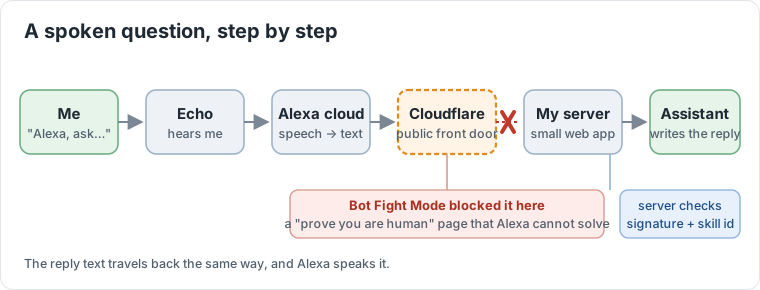
The server is a small web app. It checks that the request really came from Amazon, then hands the question to my assistant as if I had typed it, and speaks whatever comes back. The assistant needs nothing special for this, which is the point: to the skill it is a black box that takes a sentence and returns a sentence.
Amazon requires an invocation name of at least two words. The assistant’s one-word name alone was rejected, so the skill has a two-word name.
Not trusting the internet
The endpoint is public, and behind it is an agent that can act for me, so it checks three things:
- The request carries a signature header. The server downloads the certificate chain from Amazon’s certificate URL (and checks the URL really is Amazon’s), verifies the chain, and checks the SHA-256 signature over the raw body.
- The timestamp in the request must be within 150 seconds of now, so a captured request cannot be replayed later.
- The application id in the request must be my skill’s, so another skill cannot call my server.
Bug 1: I checked the wrong header
My first version read the older signature header. Amazon sends the SHA-256 one, Signature-256, and the older one is not what you verify against. Every request failed verification. This was the easy one: a log line, a fix, done.
Bug 2: Cloudflare quietly blocked Amazon
After that fix, the simulator still said only: “There was a problem with the requested skill’s response.” Nothing in my server’s log. No request had arrived at all.
The cause was not in my code. Cloudflare’s Bot Fight Mode was giving Amazon’s servers a Managed Challenge, a “prove you are human” page. Alexa cannot solve it, so it gave up and the request died before my server saw it. Cloudflare does not tell the caller why.
I only found it in the Cloudflare dashboard under Security Events: a pile of blocked requests from Amazon addresses, with the service listed as Bot Fight Mode. I turned Bot Fight Mode off and requests came through. If your server log shows nothing, the request never arrived, so look in front of the server.
Bug 3: “what” disappeared
Once requests reached the server, I asked “what is my age” and my assistant received “is my age”. My sample phrase was what {query}, and Alexa treated the word “what” as part of the phrase, not part of the question.
The fix was a custom slot type that acts as a catch-all, and a sample phrase that is only {query}. Now the whole sentence comes through unchanged.
Bug 4: Alexa only waits about 8 seconds
This one is the real problem. Alexa waits about 8 seconds for a skill to answer. A reply from an assistant that looks things up can take 10 to 60 seconds.
I fixed it in two steps:
- The skill sends a progressive response straight away, so Alexa says “One moment” while the assistant works.
- If the answer is still not ready when the wait runs out, Alexa says “Still thinking, say go on” and keeps the microphone open. When I say “go on”, the skill checks again and reads the answer.
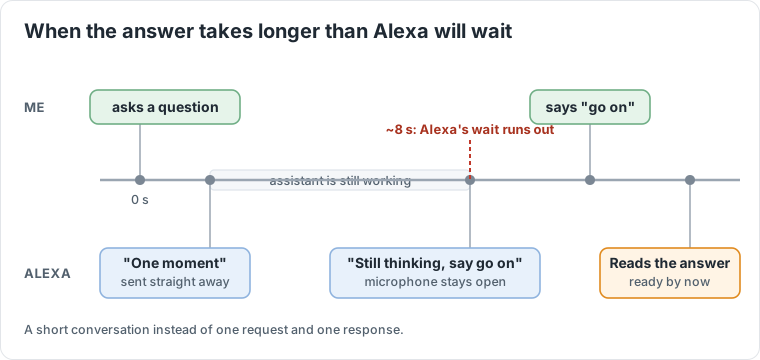
It is a small conversation instead of a single request and response. It is not elegant, but a voice interface for an agent has to be designed for waiting.
What I learned
- Two of the four bugs were not in my code. One was a header name in a spec, and one was a security product silently doing its job. Look at the layer in front before you debug the layer you wrote.
- Voice is a different shape from chat. Free-text slots, short timeouts and “say go on” are the real design work.
What is next
For now it all runs on one machine. Next I want to move the whole thing onto a Mac mini at home, so it is a quiet box on a shelf that listens and answers.
The long-term dream is the one in the movies: Iron Man’s workshop, where you talk to a room and things happen. Today it is “what did I eat today” and a one-moment pause.