I can talk to my assistant from my wrist now. The first speech error was my own language setting.
A small Wear OS app on the Pixel Watch sends my voice to my personal assistant and reads the reply back. Most of the work was in one late session with coding agents, and most of the bugs were in speech recognition settings and sideloading.
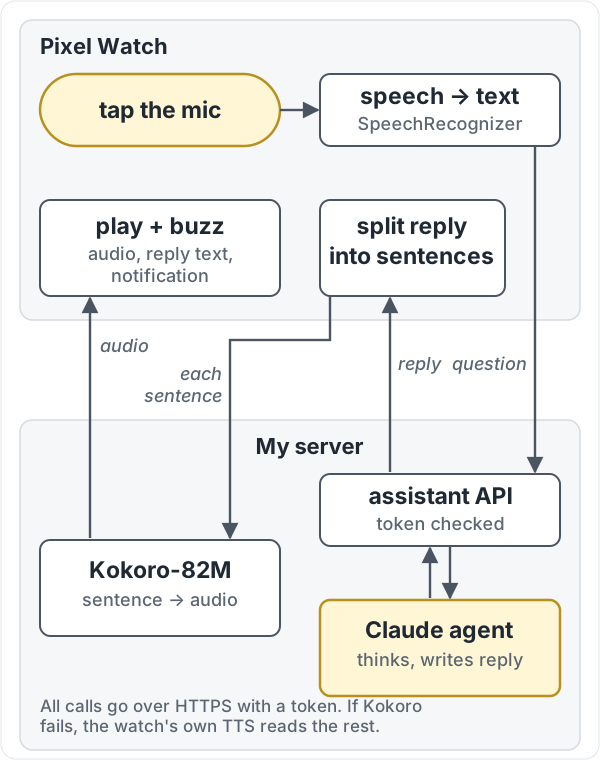
I wanted to ask my personal AI assistant something without getting my phone out. So I built a small Wear OS app for the Pixel Watch. You tap a mic, speak, and the reply appears on the screen and is read aloud. The assistant runs on my own server, and the watch talks to it over HTTPS with a token.
The first version came a few days before the rest. The last four versions, v2.1 to v2.4, were one late-night session with a coding agent, and most of what is interesting happened in that part.
What it does
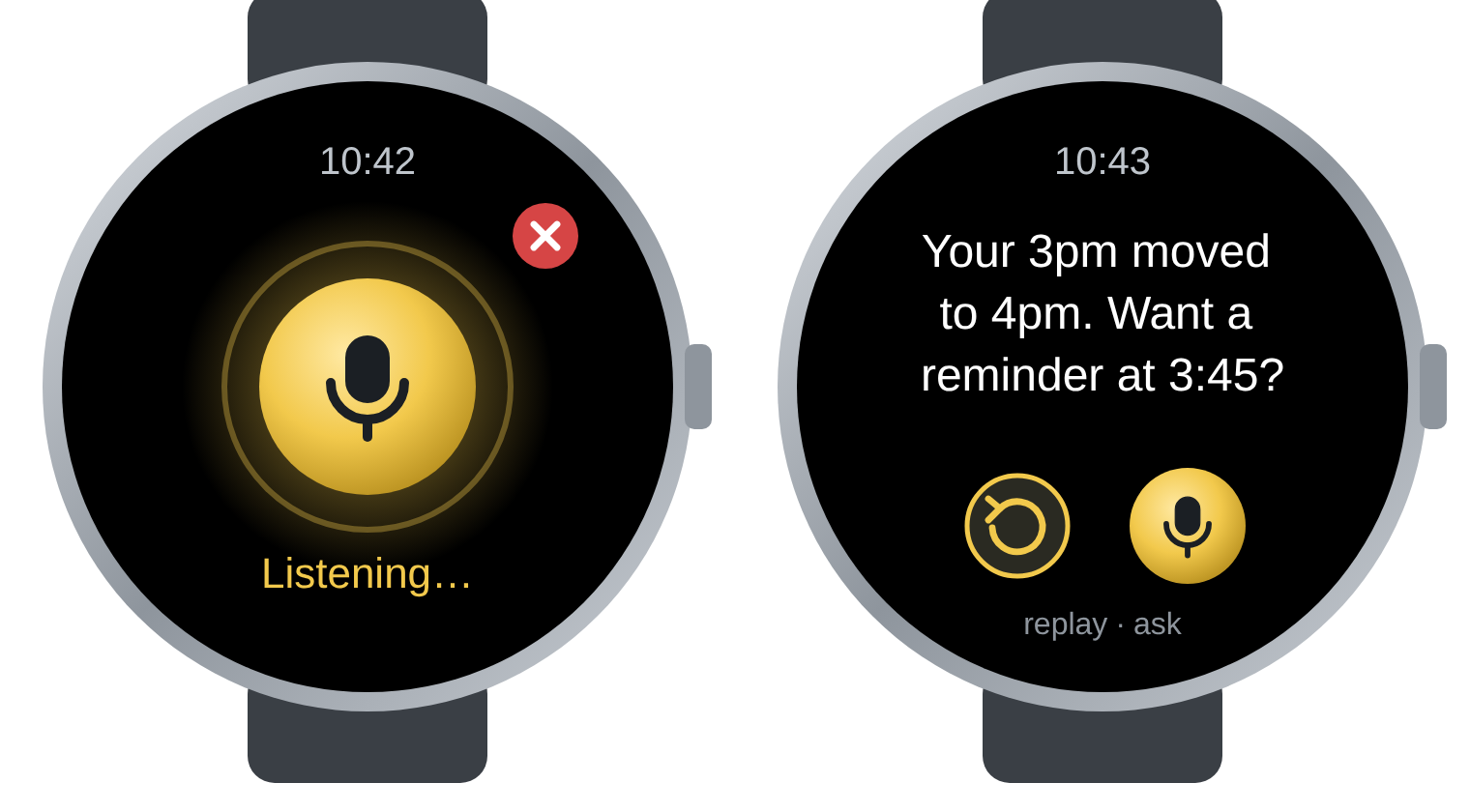
- One tap to talk. The app uses Android’s
SpeechRecognizer, sends as soon as I stop, and shows a red ✕ that discards a recording. - Conversation mode. After a reply has been spoken to its end, the app listens again by itself. “Stop”, “that’s all”, or about ten seconds of silence ends it.
- A real voice. Each reply is cut into sentences, and each sentence is synthesised on my server by Kokoro-82M, a small neural text-to-speech model. The next sentence is fetched while the current one plays. If the server can’t do it, the watch’s own text-to-speech reads the rest.
- Replay. The last reply can be spoken again, and its text stays on screen.
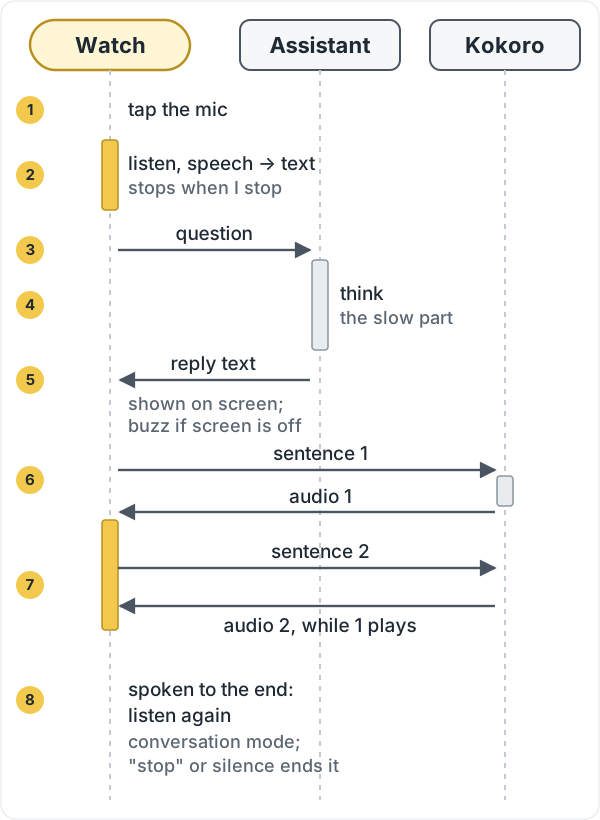
- Screen off. Asking, waiting and speaking run in a foreground service, so they keep going when the screen turns off.
- Buzz and a notification when a reply lands while the screen is off.
- Self-update. On launch, the app asks my server for a
latest.json. If there is a higher version code, it downloads the APK and hands it to Android’s package installer. Each build is signed with the same key, so after the first sideload, fixes can ship without a cable.
Here is how one question travels. Speech becomes text on the watch, the assistant on my server writes the reply, and the watch then asks the server to voice it one sentence at a time.
And the same thing as one round-trip in time:
The self-update was the most useful part to build early. The first install was the fiddliest part of the project.
Sideloading was the hard part
Installing over ADB sounds simple. On a Pixel Watch it means turning on developer options and wireless debugging, pairing with a code the watch shows, and pushing the APK to an address and port the watch also shows.
My phone and watch were both on the guest Wi-Fi at the office. That network has client isolation, so devices can’t see each other, and the pairing never completed. The watch also had a second address on its mobile-data interface, which the phone couldn’t reach either.
What worked was the phone’s own hotspot. I put the watch on it, and the Bugjaeger app on the phone did the pairing and the install. After that, self-update meant I didn’t have to do it again.
The bug: “Speech error 12”
The first real failure was the one that made me slow down. Tapping the mic showed “Speech error 12”. In the SpeechRecognizer constants, 12 is ERROR_LANGUAGE_NOT_SUPPORTED.
The app was forcing en-IN on the recognition intent, because I wanted Indian English. The watch’s recognizer didn’t accept it, so it refused.
My first fix, in v2.2, was to fall back to the device’s default language on errors 12 and 13. That failed too. The device’s own language was effectively the same en-IN setting, so the fallback asked for the same thing again.
v2.3 turned the fallback into a chain. Each mode is tried in order, and a language or service error moves on to the next one:
1
2
3
4
5
6
7
8
9
10
11
private static final String[] MODES = {"en-IN", "en-US", "on-device", "dialog"};

private void next(int err) {
    String failed = MODES[mode] + " error " + err;
    if (++mode <= DIALOG) {
        listen(auto);
        return;
    }
    prefs().edit().remove("mode").apply();
    // ...
}
The modes are en-IN, explicit en-US, the on-device recognizer where Android has one, and finally the system voice-input dialog. The first mode that hears something is saved, so later taps start there. If every mode fails, the screen says which one failed last, and the saved choice is cleared.
The first voice question came through on v2.3. I haven’t yet checked which of the four modes caught it. The app writes the mode it is using to logcat, so that is the next thing to look at.
What isn’t tested
- The only automated tests are JVM unit tests of the code that turns the assistant’s markdown into plain, speakable text. Nothing automated covers the microphone, speech, buzz, notification, or the installer. Those were checked by hand, if at all.
- I have not yet tested an update arriving on a watch that already has the app running.
- The v2.4 gold theme is a colour change I haven’t looked at closely on the watch.
What I’d tell someone else
- When an error code shows up, look at what the app actually asked for before you blame the device. Mine asked for a language the watch didn’t have.
- Sideloading to a watch is networking work, not code work. Budget for it, and ship self-update early so you only have to do it once.
- A fallback chain that remembers the step that worked is better than a single fallback. The chain runs once, and then the app goes straight to what works.